
GLACEEMR | CLINICAL DOCUMENTATION
Four Ways to Document. One Encounter. Your Call.
Ambient AI for the visit where the conversation is the chart. Specialty templates for the visit that follows a known pattern. Voice dictation for the field that needs a paragraph. Document scanning for the records and faxes the outside world keeps sending. GlaceEMR carries all four inside the same chart, and you switch between them in the middle of a single encounter without losing your place. The note you sign tonight reflects the way you practice, not the way your platform’s defaults wanted you to.
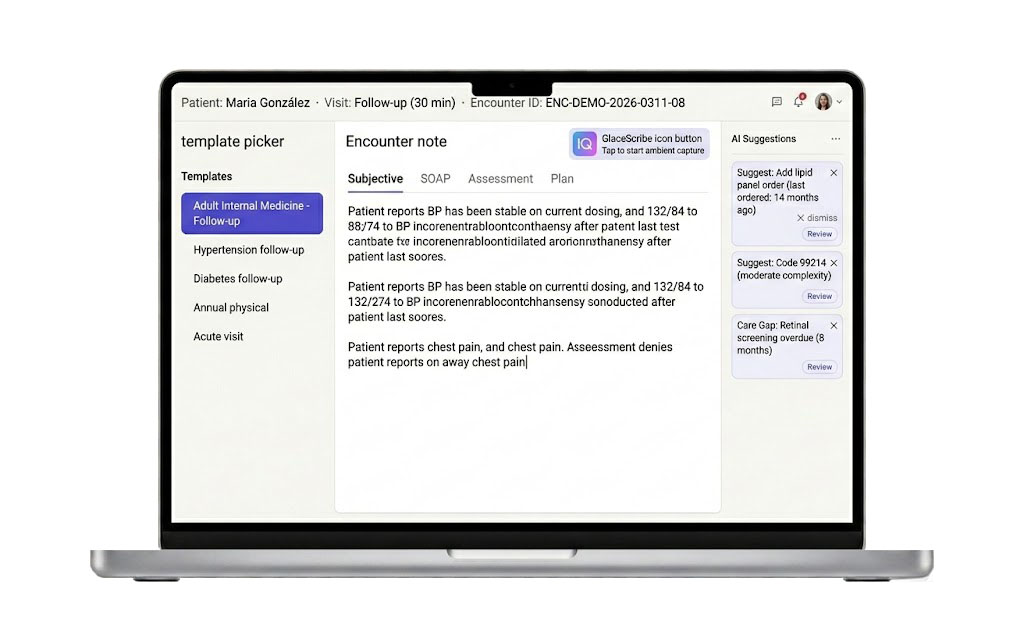
THE FOUR METHODS, AT A GLANCE
A Method for Every Kind of Visit on Your Schedule
A morning of well visits, a slot of complex chronic care, a peer call about a hospitalized patient, an inbox full of outside lab PDFs. Four very different documentation problems, all of them yours by 11 AM. GlaceEMR gives you a method for each one and lets them all coexist inside the same chart, the same encounter, and the same provider session.
1. Ambient AI with GlaceScribe
Best for the visit where the conversation is the documentation. You talk with the patient, GlaceScribe listens, and a structured SOAP note with coding suggestions is waiting for your review at the end of the encounter. You read it, edit anything that needs editing, and sign. The conversation in the room stays the work, not the typing afterwards.
2. Specialty Templates
Best for the visit that follows a known pattern. Well-child checks, infusion encounters, pre-op clearances, joint injections, post-op follow-ups. The template ships pre-built for your specialty and your visit type, your own personal layout is the one that loads when you open it, and the structured fields drop into the note on day one. You edit on the fly when the patient surprises you.
3. Voice Dictation
Best for the field that needs a paragraph in your own voice. Push-to-talk into the HPI, the assessment, the plan, or a procedure note. The medical vocabulary handles long drug names, the rare diagnoses, and the regional accents that trip up consumer dictation. You stop typing when the patient is talking, and you finish the field before you walk out of the exam room.
4. Document Management with OCR
Best for the paper the outside world keeps sending in. Faxes from the hospital, scanned consents, outside lab PDFs, prior records from a transferring practice, insurance cards at the front desk. OCR reads the document, classifies what it is, matches it to a patient, and drops it into the correct chart and provider inbox. The chart fills itself on the day the paper arrives, not three weeks later when somebody finally files it.
All four, in one chart
Mix them in the same encounter. Open with a template for the ROS and vitals, dictate the HPI in your own words, let GlaceScribe run during the patient discussion, attach the outside imaging report when it lands in the OCR queue, sign once at the end. No swivel-chair to a second app, no separate dictation service to reconcile, no paper queue to clear at the end of the day.
Bill from the chart you sign
Regardless of which method you used to document, the signature is the trigger. Diagnoses, procedures, modifiers, and E&M level land on a single review screen at signing. You select what belongs on the claim, the encounter closes, and the claim is in flight by morning. The reconciliation queue your billing team used to chase does not exist in this workflow.
METHOD 1 IN DEPTH
Ambient AI Scribe with GlaceScribe
Open the chart. Tap the GlaceScribe button. Have the visit. That is the documentation workflow. The microphone on your laptop, tablet, or phone captures the encounter audio in real time and a structured SOAP note populates while you talk. Up to four simultaneous speakers are supported, English and Spanish patient-facing, and the model holds context across the entire encounter rather than transcribing one sentence at a time.
What gets captured. The history of present illness in the patient’s own words, the review of systems as you walk through it, the physical exam findings you call out as you examine, the assessment as you reason through it, and the plan as you discuss it with the patient. Vitals from your medical assistant’s intake. Medication adjustments you mention. Orders you commit to placing. The pieces that normally become a typing session at 9 PM become the byproduct of the conversation that already happened.
What gets generated. A SOAP note structured the way your specialty documents. ICD-10 and CPT code suggestions tied to the documentation that supports them. Order recommendations for the labs, imaging, and prescriptions you discussed. Problem list updates for the chronic conditions that came up. HCC capture prompts for the Medicare Advantage relevance you might want on the claim. Every output is presented as a suggestion in your review screen, not a finished entry in the chart.
The physician-review loop. When the encounter ends, GlaceScribe presents the proposed note and the proposed coding side by side with the source audio segments that produced each section. You read, you edit, you delete, you add. You accept the codes you agree with and reject the ones you do not. You sign. The note becomes the chart at the moment of signature, not before. Nothing carries your name on it until your name is on it.
Where the AI runs. Built on HIPAA-compliant AI infrastructure from Amazon, Google, Anthropic, Deepgram, ElevenLabs, and other enterprise AI providers, all under business associate agreements. The multi-vendor architecture preserves operational redundancy, so a single upstream incident does not stop your visits, and it keeps the platform able to adopt the next generation of voice and language models as they ship. Audio is processed in transit. The resulting note is stored in your single-tenant chart database. Your data never trains a shared model that mixes your patients with anybody else’s.
Where it lives in the day. Most providers who adopt GlaceScribe stop opening the laptop after dinner. The note that used to take fifteen minutes of typing after each patient takes ninety seconds of reading and a signature. The visit that used to require turning your back to the keyboard becomes a visit where you sit across from the patient and pay attention to them. Whether that adds up to two more patients per session or two more hours with your family is a decision you get to make for the first time in a while.
METHOD 2 IN DEPTH
Specialty Templates, Physician-Editable
Templates are how repeating visits stay fast. A well-child check, a diabetic follow-up, a pre-op clearance, an infusion encounter, a joint injection, a wound-care visit. The clinical reasoning is the same shape every time, the structured fields are the same set every time, and the documentation should not feel like a new project on each patient. GlaceEMR ships a library of templates built per specialty, per visit type, and per role, and you can edit any of them on your own time without filing a ticket.
Specialty-specific by default. Twenty-plus specialty modules ship with templates that were built from inside the specialty, not retrofitted from a generic primary-care chassis. A cardiology echo follow-up looks like a cardiology echo follow-up. A pediatric well-child template carries the age-appropriate growth, developmental, and immunization fields and the Bright Futures structure. A wound-care template carries the structured location, stage, size, and tissue fields a podiatrist needs to justify the procedure code and to defend the visit at audit. The layouts reflect how your specialty thinks about the visit, not how an EHR product manager generalized it for a horizontal launch.
Provider-specific layout. The layout you set on Monday is the layout you have on Friday. Your associate uses a different layout. Your locum uses a third. The system does not force consensus on a personal documentation style that nobody agreed should be consensus. Vitals on the left or on the right, problem list at the top or in a side rail, ROS as a checklist or as a narrative block, smart phrases that match your own habits, all of it sticks per provider and follows you into every encounter.
Visit-type-specific structure. Annual physicals, sick visits, procedure visits, transitional care management visits, behavioral health integration visits, follow-ups, telehealth visits, and post-op visits each get a template tuned to the documentation that visit type requires. Time-based codes capture the time field by default. Procedure visits carry the structured procedure note fields. TCM visits carry the day-of-discharge date and the medication reconciliation block. You stop having to remember which fields the payer wants for which visit type, because the template carries it for you.
Real-time customization. The patient walks in with a complaint that does not fit the template you opened. You add a section in the middle of the encounter. You drop in a smart phrase from your personal library. You modify the assessment with your own paragraph. You save the new variant as a personal version for next time, or you let the change apply to this encounter only. The template adapts to the patient in the room rather than forcing the patient into the template’s defaults.
Smart phrases and macros. A two-character keystroke expands to a paragraph you wrote once and reuse every time the situation calls for it. Your favorite normal-exam paragraph. Your standard counseling block on smoking cessation. Your usual depression screening summary at the patient’s stated severity. Your most common discharge instructions. You build your library on your own schedule, you copy from a colleague, and you keep adding to it as your practice evolves. The keystrokes belong to you, not to a vendor’s macro store.
METHOD 3 IN DEPTH
Voice Dictation, Field-Level or Free-Text
Dictation is not ambient capture and it is not meant to be. Dictation is for the moment you know exactly what you want the chart to say and you would rather speak it than type it. The HPI paragraph that explains the symptom timeline in your own words. The assessment that walks through your reasoning. The procedure note that needs your signature attestation. The plan paragraph that ties the encounter to the next visit. You push the mic button in the field, you speak the paragraph, you stop the mic, and the field is filled.
How it differs from ambient. Ambient runs in the background and captures the conversation between you and the patient. Dictation runs in the foreground and captures the paragraph you intentionally narrate into a specific field. Ambient is for the visit. Dictation is for the field. Most providers who use both end up running ambient during the patient discussion and using dictation later in the day to add the long assessment or the procedure attestation that the ambient model intentionally left for you to write.
Field-level dictation. Tap into any text field in the chart and the mic icon is right there. Dictate into the HPI, the ROS, the assessment, the plan, a structured note field, a refill justification, a peer-to-peer call summary, a prior-auth letter, a referral note, an inbox reply to a patient. The dictation goes where the cursor is, not into a transcription queue that lands somewhere else.
Free-text dictation. Open a blank note and dictate the entire encounter. The model cleans filler words, punctuates as you pause, and structures the result into the note’s standard sections when you ask it to. The narrative chart you sign reads the way you talk, not the way a speech-to-text engine guessed at your syntax.
Medical vocabulary that holds up. The long drug names, the rare diagnoses, the regional pronunciations, the abbreviated procedure phrases. The vocabulary handles them. Hydroxychloroquine, semaglutide, eculizumab, romosozumab, all transcribed correctly the first time. The names of the conditions and the procedures you encounter every week are in the model’s vocabulary, not absent from it. The dictation that used to require a thirty-percent edit pass becomes the dictation that requires a quick read and a signature.
When to use it. When the patient is on hold and you have a free thirty seconds. When the procedure attestation needs your specific phrasing. When the assessment requires a paragraph of clinical reasoning that nobody else can write for you. When you are mobile on a phone and typing is impractical. When you prefer the cadence of speaking to the cadence of typing for a particular field. The tool is there when you reach for it and it is silent when you do not.
METHOD 4 IN DEPTH
Document Management with Built-In OCR
Most of the documentation your practice handles is not generated inside your chart. It arrives from outside. The hospital faxes a discharge summary. A specialist sends a consult note. The lab returns a result on a contract you do not have an interface for. The patient hands the front desk an insurance card, a prior records packet, and a list of medications they are taking. The radiology center emails over a PDF of a report. Outside paper and outside PDFs are a constant inflow, and every page needs to land in the right chart, attached to the right encounter, in the right provider’s inbox, on the day it arrives.
Multiple intake channels. Inbound fax (eFax integration), scanned paper from the front-desk scanner, drag-and-drop file upload, email-to-chart routing for trusted senders, and the patient portal upload from the patient themselves. The intake point is wherever the document came from. The destination is always the chart.
OCR classification. Every incoming document is read by the OCR engine and proposed for classification: lab report, imaging report, hospital discharge summary, consult letter, insurance card, ID, prior records packet, signed consent, advance directive, referral request, prior-auth response, EOB, patient correspondence. The classification carries to the chart’s filing structure so the document lands in the right tab, not in a generic “scanned documents” bucket that nobody reads.
Patient and provider routing. The OCR reads the patient name, date of birth, and identifiers on the document and proposes the matching chart. Your front desk confirms the match in a single click. The document then routes to the ordering or referring provider’s inbox so the right physician is the one who reviews it, not whoever happens to open the shared queue first.
Attachment workflow inside the encounter. When you open a chart for a follow-up visit, the outside imaging report that arrived yesterday is already attached and waiting. You read it inside the encounter, reference it in your note, and the linkage between your documentation and the source document is preserved at the encounter level. The audit trail later will show what you saw at the moment you made the clinical decision.
What stops happening when this works. The front desk stops triaging a stack of paper at the end of the day. The medical records clerk position stops being a separate body. The chart no longer fills three weeks late with the documents that arrived during the week of the visit. The “where is the prior MRI” question stops being a hunt and starts being a click. The encounter you walk into on a Tuesday morning carries the outside records that arrived the previous Friday, not a placeholder that says somebody will file them later.
THE DIFFERENTIATOR
Switch Methods Mid-Encounter Without Losing Your Place
The argument other technology vendors make is that ambient AI is a replacement for templates. It is not, and the vendors that pitch it that way have never spent a real Tuesday in a clinic. A diabetic follow-up wants a template for the structured fields and ambient for the patient discussion and dictation for the assessment paragraph and the outside lab PDF that arrived this morning attached to the encounter. Forcing the visit into one documentation method to satisfy a software architecture is the wrong tradeoff.
Inside a single GlaceEMR encounter, you might do all of the following without closing or reopening anything:
- Open the diabetic follow-up template you authored last year.
- Tap GlaceScribe on as the patient sits down so the conversation captures into the HPI and the plan as you talk.
- Glance at the outside lab PDF from the imaging center, already attached to the encounter from the morning’s OCR intake.
- Type two structured values into the template (A1c trend, microalbumin) where typing is faster than speaking.
- Push-to-talk dictate the assessment paragraph after the patient leaves, in your own words.
- Review the GlaceScribe-proposed coding suggestions, accept the ones you agree with, modify the E&M level, and sign.
All four documentation methods, one encounter, one signature. The chart carries the full picture and the claim drops on the same chart you signed. You do not lose context when you switch methods. You do not reopen the encounter. You do not reconcile a separate dictation product against your note. The methods coexist because they were built to coexist, not because a vendor bolted a scribe onto a chart product after the fact.
REVIEW AND SIGNATURE
The Physician Reviews. The AI Suggests. Always.
Every AI-generated output in GlaceEMR is presented as a suggestion in your review screen. Nothing reaches the chart until you accept it. Nothing carries your signature until you sign. This is a design choice, not a marketing line. The vendors that pitch AI as “agentic” or as a hands-off coder are pitching a product that has not yet earned the medical-legal risk of carrying a physician’s name on a chart without the physician having read what is on it. We do not ship that product, and we do not plan to.
Note suggestions. The ambient draft is presented for your read. You edit any paragraph, you delete what does not belong, you add what the model missed. The audio segment that produced each paragraph is one click away if you want to verify what the patient actually said. Your edits become the chart at the moment of signature.
Code suggestions. ICD-10 diagnoses, CPT procedure codes, modifiers, and an E&M level are proposed based on the documentation the model just produced. You see each code with the supporting documentation that justifies it. You accept the codes that match the visit. You reject the ones that do not. You modify the E&M level if your clinical judgment lands differently than the model’s pattern match. The encounter closes with the coding you selected, not with the coding the AI assumed.
Order suggestions. If you discussed an order during the visit, GlaceScribe proposes it. A repeat A1c. A statin. A referral to GI. A pre-op echo. You see the proposed order in your review queue, you confirm or modify it, and the order lands in the queue that sends it on its way. The orders never place themselves.
Problem list and HCC capture suggestions. Conditions you mentioned in the documentation but did not formally add to the encounter’s diagnosis list are flagged for your review. The HCC-relevant ones for Medicare Advantage patients are surfaced with the supporting documentation. You decide what belongs on the encounter and what belongs on the claim. The RAF score that ends up on the books reflects the panel you actually care for, because you reviewed every addition.
Why this matters at audit. The chain of custody on every AI-touched chart is clean: AI suggested, physician reviewed, physician modified, physician signed. The audit trail logs each step. The note you defended in court three years from now is the note you signed, not a note the AI signed on your behalf. The medical-legal posture is the same one you would have had if you had typed every word, and the time savings are real because the AI did the heavy lifting on the typing, not on the judgment.
SPECIALTY ADAPTATION
Each Specialty Documents Differently. So Does the AI.
A cardiology note is structured differently than a pediatric well-child note. A behavioral health CoCM consult is structured differently than a podiatry wound visit. The ambient model, the templates, and the structured output of each documentation method are specialty-aware on day one, not configured during a six-month consulting engagement after go-live.
The vocabulary, the section structure, the coding suggestion logic, the order set recommendations, and the HCC capture prompts all adapt to the specialty you practice. The deep walkthrough of how this works lives on the GlaceScribe specialty page, including coverage matrices for the twenty-plus specialties built today and the path to adding the next one.
QUESTIONS WE HEAR EVERY WEEK
Clinical Documentation FAQ
The questions below come up in almost every discovery call when a physician is evaluating GlaceEMR for documentation. Short answers below; the longer conversation happens on the demo. Tap any question to expand the answer.
Can I really mix ambient, templates, and dictation in the same encounter?
Yes. The four documentation methods coexist inside a single chart and a single encounter. Open a template for the structured visit elements, tap GlaceScribe on for the patient conversation, push-to-talk dictate the assessment paragraph, and review the outside lab PDF that the OCR intake routed to the encounter this morning. One signature closes all of it. You do not reopen the encounter, you do not reconcile a separate dictation product, and you do not lose context when you switch methods. The product was built around the assumption that a real visit uses more than one documentation method, and the workflow reflects that on day one.
Does the AI ever close a note or sign on my behalf?
No. Every AI-generated output is a suggestion in your review screen. The note is a draft until you read it. The coding is a proposal until you accept or modify it. The orders are recommendations until you confirm them. Nothing reaches the chart until you accept it, and nothing carries your name until you sign. The chain of custody on every AI-touched chart logs each step: AI suggested, physician reviewed, physician modified, physician signed. The audit trail is the one you would defend in court, and the only signature on the chart is yours.
Where does the AI run, and is my patient data used to train models?
GlaceScribe runs on HIPAA-compliant AI infrastructure from Amazon, Google, Anthropic, Deepgram, ElevenLabs, and other enterprise AI providers, all under business associate agreements. The multi-vendor architecture preserves operational redundancy. Audio is processed in transit, the resulting note is stored in your single-tenant chart database, and your data never trains a shared model that mixes your patients with anybody else’s. The chart database itself is hosted on infrastructure with LUKS full-disk encryption in production. The deeper architecture conversation happens on the demo, and the BAA paperwork is straightforward.
How long before my team is fluent in all four methods?
Clinical training runs 2 to 4 focused hours per provider during onboarding, delivered in pieces around real clinic, not in a multi-day block that forces you to cancel patients. Most providers are comfortable with templates and field-level dictation by the end of the first week. Ambient takes another two to three weeks of pattern recognition: which kinds of visits suit it best, when to lean on it versus a template, and the way to narrate in the room so the model captures what you want it to capture. Targeted follow-ups for specialty templates, the OCR workflow, and the AI documentation tools stack on whatever cadence works for your schedule. The self-help library of workflow documents and videos is available around the clock for the moments somebody just needs a quick refresher.
What happens to the dictation and ambient capabilities if I am on a tablet or phone?
Both work on the native tablet and phone apps. Push-to-talk dictation runs into any text field on the mobile chart, and GlaceScribe ambient capture runs on the phone microphone the same way it runs on a laptop microphone. The mobile experience is a native app, not a desktop site shrunk to fit a phone, and the buttons are sized for a thumb. Inbox triage, verbal orders, refill approvals, peer-to-peer call documentation, and mid-day chart catch-up are all viable on the phone in the way they should have always been viable.
Can I customize templates myself, or do I have to file a ticket?
You customize your own templates. Add a section, drop in a smart phrase, modify the layout, save a personal variant, share with a colleague, all without a configuration team and without a ticket. The principle is that clinical style is personal and the system does not force consensus on documentation choices that nobody agreed should be consensus. The configuration tools your IT staff would normally lock behind a permission set are available to providers by default, on a per-provider scope, so you cannot accidentally rewrite somebody else’s template while you are personalizing your own.
See What Glenwood Can Do for Your Practice
A 20-minute working call. We show you the platform on your specialty’s actual workflows, not a generic demo.